Automatic flashcard generation
🎉 100% FREE

Your lectures. 50+ flashcards. In minutes.

Upload a PDF or PowerPoint. Get cloze deletions, Q&A cards, and image occlusion cards from your text and diagrams — automatically.
Ocular_Anatomy_Lec5.pptx → 47 cards
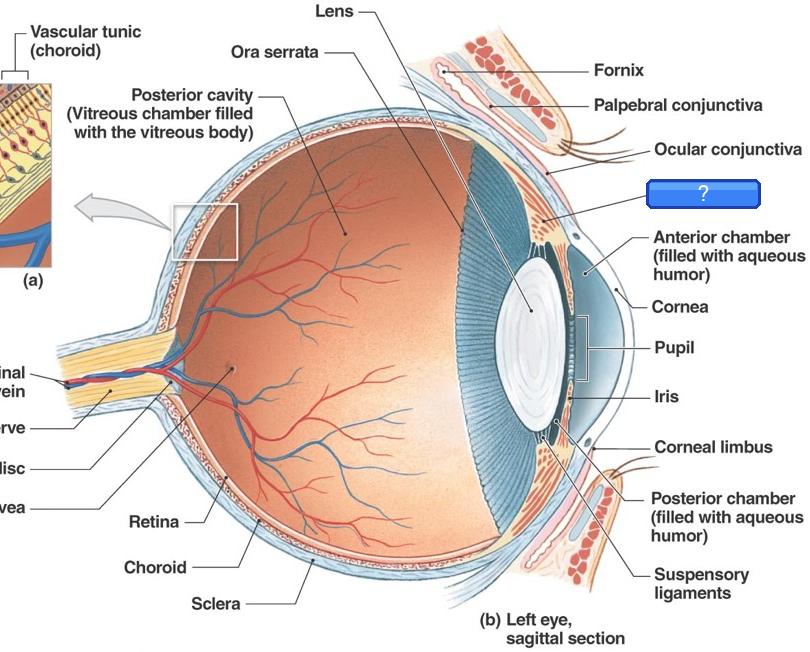
IMAGEIdentify the hidden label
Eye anatomy diagram with occluded label over Cornea
💡 Transparent tissue covering the iris and pupilCornea
CLOZE

The sinoatrial (SA) node generates impulses at 60–100 bpm

Q&A

Why does the plateau phase of the cardiac action potential prevent tetanic contraction?

CLOZE

Ejection fraction (EF) = SV/EDV, normal >55%. EF <40% = HFrEF

New feature

Your diagrams become flashcards. Automatically.

Upload slides with labeled diagrams. Labels are detected automatically and turned into image occlusion cards — hiding one label at a time. Trivial labels are skipped. No manual work.

Every label detected with pixel-perfect accuracy
Difficulty classified automatically — skips what you already know
One diagram generates multiple testable cards

Works with any labeled diagram

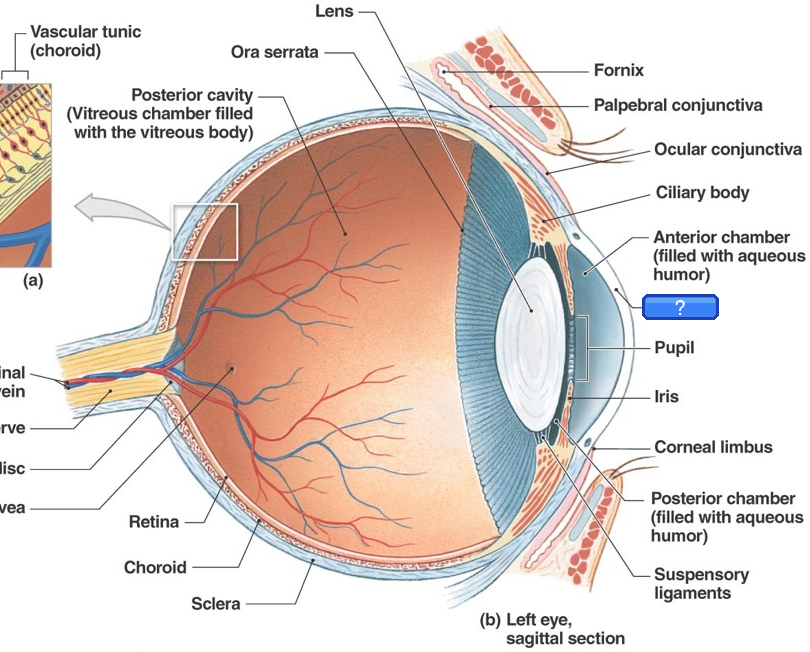
Occluded: Ciliary body
What label is hidden?
Ciliary body
💡 Controls lens shape for accommodation — produces aqueous humor

From: Ocular Anatomy

Three card types

Every concept. The right format.

The right card type for each concept — cloze for facts, Q&A for reasoning, image occlusion for diagrams.

{...}
Cloze Deletions

Fill in the blank

Key terms, values, and relationships hidden in context. Tests active recall of specific facts.

The [SA node] fires at [60–100 bpm]
Image Occlusion
NEW

Label the diagram

AI detects labels on your diagrams and hides them one by one. Skips trivial labels — tests what actually matters.

Hyperopia
Focal plane
Q&A
Q&A Cards

Explain the mechanism

Reserved for "why" and "how" questions that need deeper reasoning, not just single-word recall.

Q: Why does hyperkalemia cause peaked T waves?
A: Elevated K⁺ accelerates phase 3 repolarization...

How it works

Three steps. Just a few minutes.

Step 1

Upload your slides

Drag and drop any lecture PDF or PowerPoint. Text and images are extracted automatically.

Step 2

Cards generated automatically

Your text and diagrams become cloze, Q&A, and image occlusion cards. Thorough coverage, no manual work.

Step 3

Review & export

Edit, like, or delete any card. Export as .apkg and import directly into Anki. Done.

2–3 hrs

saved per lecture

3 types

cloze · Q&A · occlusion

Smart

card count adapts to content

PDF & PPTX

formats supported

FAQ

Common questions

Is it really free?
Yes, completely free. No credit card, no trial period, no hidden limits. We're building this for med students who are already drowning in expenses.
Do I need to create an account?
Nope. Upload, generate, and export without signing in. If you want to save decks to a personal library so you can access them later, you can optionally sign in with Google — but it's never required.
How good are the generated cards?
Cards are optimized for medical education. You'll get cloze deletions for facts, Q&A for mechanisms, and image occlusion for diagrams. Every card is editable before export.
Can I customize what types of cards I get?
Yes. Before generating, open "Card options" to toggle cloze and Q&A cards, enable or disable image occlusion, choose coverage depth (concise, balanced, or thorough), and decide whether to hide other labels on diagram cards.
What file formats are supported?
PDF and PowerPoint (.pptx). We extract all text and images, including embedded diagrams and charts.
Will the cards work with my existing Anki setup?
Yes. We export standard .apkg files that import directly into Anki desktop or AnkiMobile. Cards use the default note types (Basic, Cloze, Image Occlusion) so they work with any deck.
How many cards does it generate?
It depends on your content and the coverage depth you choose. Concise generates roughly 1 card per slide, balanced about 2, and thorough 3–4. A typical 50-slide lecture on balanced produces 40–80 cards. You can stop generation early or delete cards you don't need.
Can I edit the cards before exporting?
Absolutely. Review every card, edit the text, delete ones you don't want, and only export what you'll actually study. Undo and redo are supported if you change your mind.
Can I save my decks and access them later?
Without an account, your last few decks are cached in your browser for 24 hours. Sign in with Google to save decks permanently to your personal library — accessible from any device.
Is my data private?
Your slides are processed and then deleted. We don't store your lecture content or share it with anyone.

Stop spending hours making flashcards.

Upload your first lecture. One file in, dozens of study-ready cards out.

Get started — it's free

Keefer Gregoire

Built by a software engineer with a girlfriend in med school who understands that getting even a little time back can mean everything.

Keefer Gregoire