Your lectures. 50+ flashcards. In minutes.
Upload a PDF or PowerPoint. Get cloze deletions, Q&A cards, and image occlusion cards from your text and diagrams — automatically.
The sinoatrial (SA) node generates impulses at 60–100 bpm
The plateau phase of the cardiac action potential prevents tetanic contraction by maintaining prolonged depolarization
Ejection fraction (EF) = SV/EDV, normal >55%. EF <40% = HFrEF
Deck improvements
Already have a deck?
Fill in what it's missing.
Bring your Anki deck and lecture slides. Find missing concepts and get suggested improvements to the cards you already study, each backed by a source slide.
Keep, edit, or reject. Every change is your call.
Improve your deckExample suggestions
Which chamber pumps blood to the lungs?
Right ventricle.
Original: The SA node is a [pacemaker].
Proposed: The [SA node] initiates normal cardiac rhythm.
Deck tools
Two decks.
Just what you need.
Bring your own deck and a classmate's, or pick two from your Library. Merge them, keep what they both cover, or remove material you already have.
AI helps find matching facts, even when the wording differs. Review the result, start with uncertain matches, and edit or restore cards before you export.
Your card types and media stay intact. Your original decks stay yours.
Deck toolsYour deck
SA node
AV node
Other deck
SA node
Purkinje fibers
Try an example
Your result
3 cardsBoth decks, without repeating the same fact.
SA node
Initiates normal cardiac rhythm.
AV node
Delays the impulse before ventricular contraction.
Purkinje fibers
Conduct the impulse through the ventricles.
Your quality check
See every answer before it reaches Anki.
Review one card at a time. Keep the cards you trust, edit the almost-right ones, and dismiss the rest before you export.
The sinoatrial (SA) node normally generates impulses at 60\u2013100 bpm.
Intrinsic conduction system — lecture slide 18
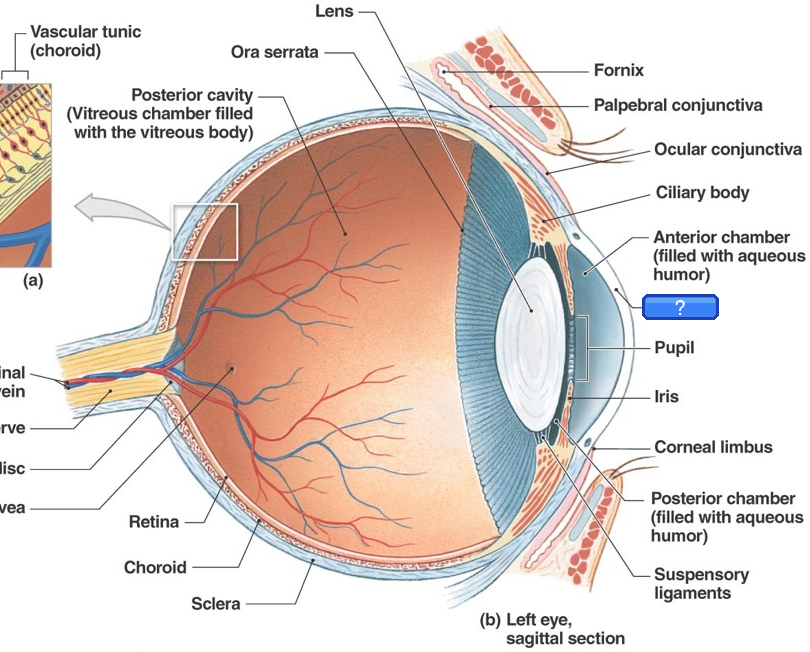
Your diagrams become flashcards. Automatically.
Upload slides with labeled diagrams. Labels are detected automatically and turned into image occlusion cards — hiding one label at a time. Trivial labels are skipped. No manual work.
Works with any labeled diagram
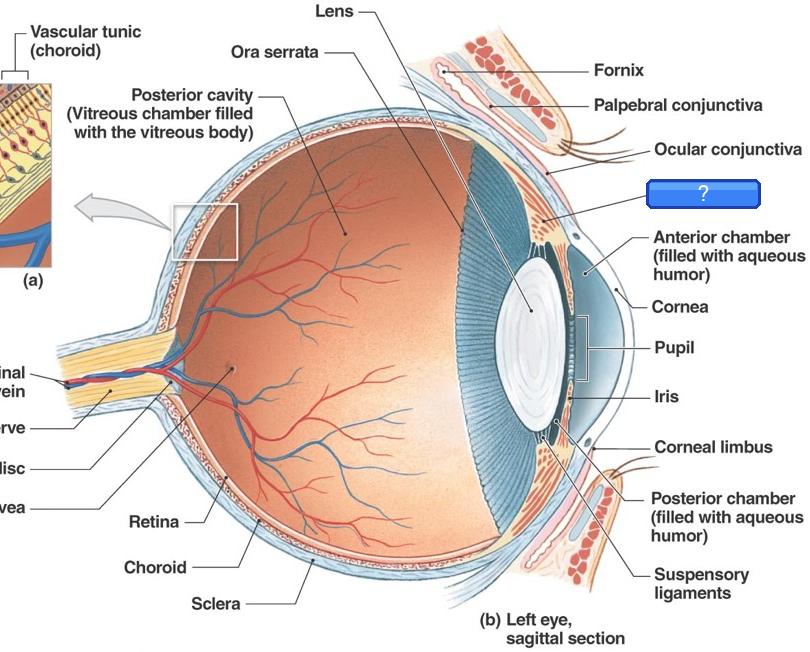
From: Ocular Anatomy
Three card types
Every concept. The right format.
The right card type for each concept — cloze for facts, Q&A for reasoning, image occlusion for diagrams.
Fill in the blank
Key terms, values, and relationships hidden in context. Tests active recall of specific facts.
Label the diagram
AI detects labels on your diagrams and hides them one by one. Skips trivial labels — tests what actually matters.
Explain the mechanism
Reserved for "why" and "how" questions that need deeper reasoning, not just single-word recall.
How it works
Three steps. Just a few minutes.
Upload your slides
Drag and drop any lecture PDF or PowerPoint. Text and images are extracted automatically.
Cards drafted automatically
Your text and diagrams become cloze, Q&A, and image occlusion cards—ready for your review.
Keep the cards you trust
Approve, edit, or dismiss each source-backed card. Sync text cards to Anki desktop or export a complete .apkg.
More than a card generator
A study workflow that improves with you
Trace every answer, teach the generator your preferences, and keep your lectures moving without losing the review step.
See the supporting slide
Every text card links back to a slide and source excerpt. A lecture coverage map shows what is represented—and what is not.
Teach it what good means
Keeps, edits, rejects, and incorrect flags become structured feedback that shapes later generations.
Upload several lectures
Queue lectures together, then review each at your own pace. Organize your saved decks into Library folders.
Reuse work safely
Repeat uploads can reuse cards you already approved. Opt-in trusted cards need multi-student agreement and fresh source grounding.
saved per lecture
cloze · Q&A · occlusion
card count adapts to content
formats supported
Pricing
Priced for the med student budget
3 free generations per month. Upgrade to Unlimited for $15/month or $149/year.
Free
Try the full review workflow on real lectures.
- 3 generations / month
- Create, improve, or combine decks
- Cloze, Q&A, and image occlusion
- Source-backed review and coverage
- Export to Anki (.apkg)
- No saved-deck limit
- Named Library folders
Unlimited
We make the cards your deck is missing.
- Unlimited generation
- Improve your existing Anki decks
- Merge, overlap, and subtract decks
- Review additions and changes with source slide citations
- Cloze, Q&A, and image occlusion
- All coverage depths
- Bulk lecture uploads
- Named Library folders
- Unlimited cloud library
- Original lecture file storage
- Priority generation queue
FAQ
Common questions
Is it really free?
Can I improve a deck I already use?
Can I combine decks I already have?
Can I cancel anytime?
Do I need to create an account?
How can I organize my decks?
How good are the generated cards?
Can I customize what types of cards I get?
What file formats are supported?
Will the cards work with my existing Anki setup?
How many cards does it generate?
Can I edit the cards before exporting?
Can I save my decks and access them later?
Is my data private?
Stop spending hours making flashcards.
Upload your first lecture. One file in, dozens of study-ready cards out.

Hi, I'm Keefer.
My partner is in medical school, so I know how much even a little time back can mean. I built SlideToAnki to help you spend less time making flashcards and more time learning, resting, or being with the people you love.
Have a question, an idea, or something that isn't working? You can contact me directly. I'm here to help.